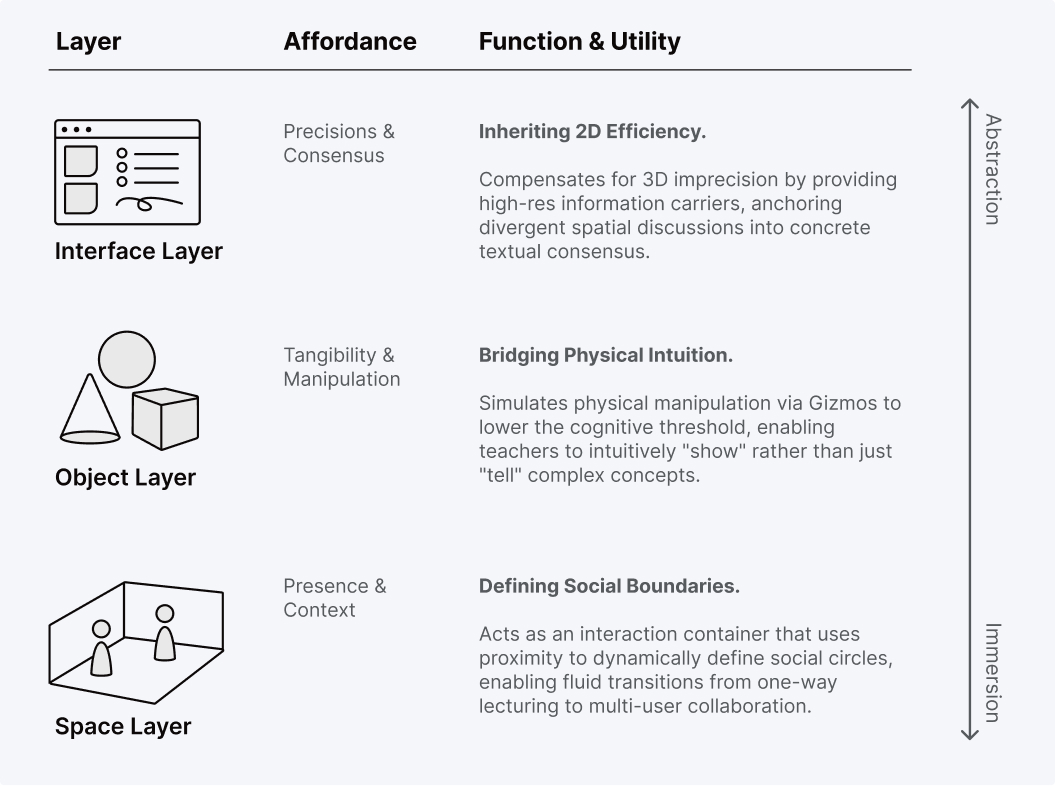
The Paradox in Virtual Education
While UNIVERSE promised an immersive virtual campus, the interaction model remained stucked to legacy 2D paradigms—such as screen sharing and static slides. Teachers were broadcasting to screens rather than engaging with the space, turning the 3D environment into a mere visual backdrop rather than a functional utility.
Product Challenges
- Weak Differentiation: The product failed to leverage spatial computing as a strategic moat. Without unique spatial utilities, the “hollow” 3D environment struggled to compete with established 2D tools like Zoom or Teams.
- Limited Expression: Interaction was confined to text, flat UI controls, and emojis, lacking true spatial agency for non-verbal communication.
- Fragmented Workflow: Teachers were forced to toggle between external apps for basic tasks, breaking the immersive loop and disrupting student concentration.

Defining the Unique Value of Spatial Learning
We started with a fundamental question: “What class can only be taught here?” To differentiate UNIVERSE from traditional video conferencing tools (like Zoom), we focused on leveraging the unique affordances of 3D space:
Core Objectives
Restoring Physicality: To bring the intimacy and “hands-on” feel of a physical lab into the virtual world.
Facilitating Dynamic Interaction: To support seamless transitions between “Lecturing Mode” (teacher-led) and “Breakout Mode” (student-led), while maintaining teacher oversight.
Key Features Implemented
3D Object Library: Allowing teachers to import and manipulate artifacts for immersive demonstrations.
Movable Interactive Board: Transforming the whiteboard from a fixed surface into a mobile tool for agile group collaboration.
3D Object Library - From Abstract to Tangible
In traditional online classes, knowledge is often confined to flat slides and abstract descriptions. We identified a critical gap: the lack of spatial demonstration. To truly leverage the metaverse, we needed to transform the virtual classroom into a spatial laboratory. The 3D Object Library was conceived not merely as a storage bin for assets, but as a vehicle for “Tangible Pedagogy”—enabling teachers to articulate complex concepts through manipulatable, physical artifacts.
Core Objectives
- Enable Fluid Pedagogy: The system must seamlessly toggle between Synchronous Mode (Teacher-led demonstration) and Student-Paced Mode (Individual exploration), supporting diverse teaching styles.
- Democratize 3D Content: We aimed to empower non-technical teachers to easily import and manage 3D assets as teaching materials, expanding the curriculum beyond 2D limitations.
- Orchestrate Collaboration: A robust permission framework was essential to ensure that 30+ users could view and interact with objects safely under the teacher’s supervision.
Challenges
- Usability vs. Freedom: Standard 3D software (like Blender) offers total freedom but creates a high cognitive load. The challenge was to design a "Low-Floor, High-Ceiling" interaction model suitable for K-12 teachers who are not gamers.
- Order in Multiplayer Chaos: Real-time collaboration creates engagement but risks chaos. We needed a system to resolve conflicts when multiple students attempt to grab or move objects simultaneously.
- Cross-Disciplinary Complexity: Aligning Design, Art, and Engineering to deliver a library of 300+ interactive assets within strict Unity performance budgets. This required defining precise specs for rendering efficiency and state synchronization, ensuring a stable, high-fidelity experience even on resource-constrained student tablets."
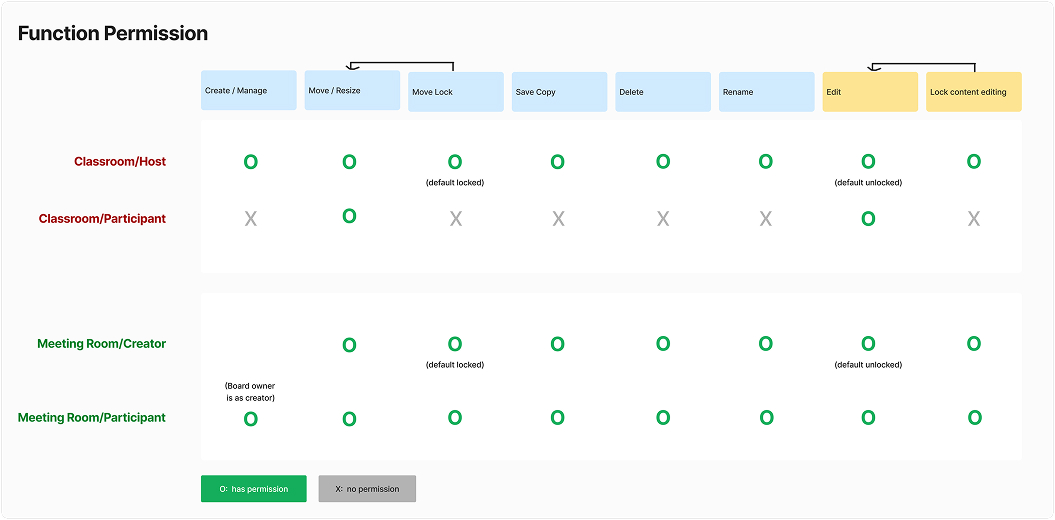
Permission Design: Speculation & Back-Propagation
Our core users—teachers and students—are mostly “Digital Immigrants” in the 3D world. They are accustomed to 2D slides, not game controllers. To bridge this gap, I facilitated co-creation workshops (using FigJam) with Sales, Education Experts, and PMs to map out realistic teaching scenarios.
End-to-End Scenario Simulation
To ensure no detail was overlooked, I facilitated a rigorous Cognitive Walkthrough of the entire teaching cycle. We mapped out the full journey—from a teacher preparing a lesson to the final class wrap-up—scrutinizing hundreds of micro-interactions to stress-test the system.To move beyond a generic feature list, I facilitated a User Journey Workshop with stakeholders (Sales, Ed Experts, PMs). We simulated a real 45-minute class session to interrogate edge cases and define the functional scope.
Selected Key Debates: While we resolved dozens of edge cases during the session, four critical design debates stood out. These specific decisions defined the core architecture of our permission system:
- Asset Provenance (Spawn Logic)
- Hierarchical Control (Override Power)
- Concurrency Handling (Conflict Resolution)
- Contextual Grouping.
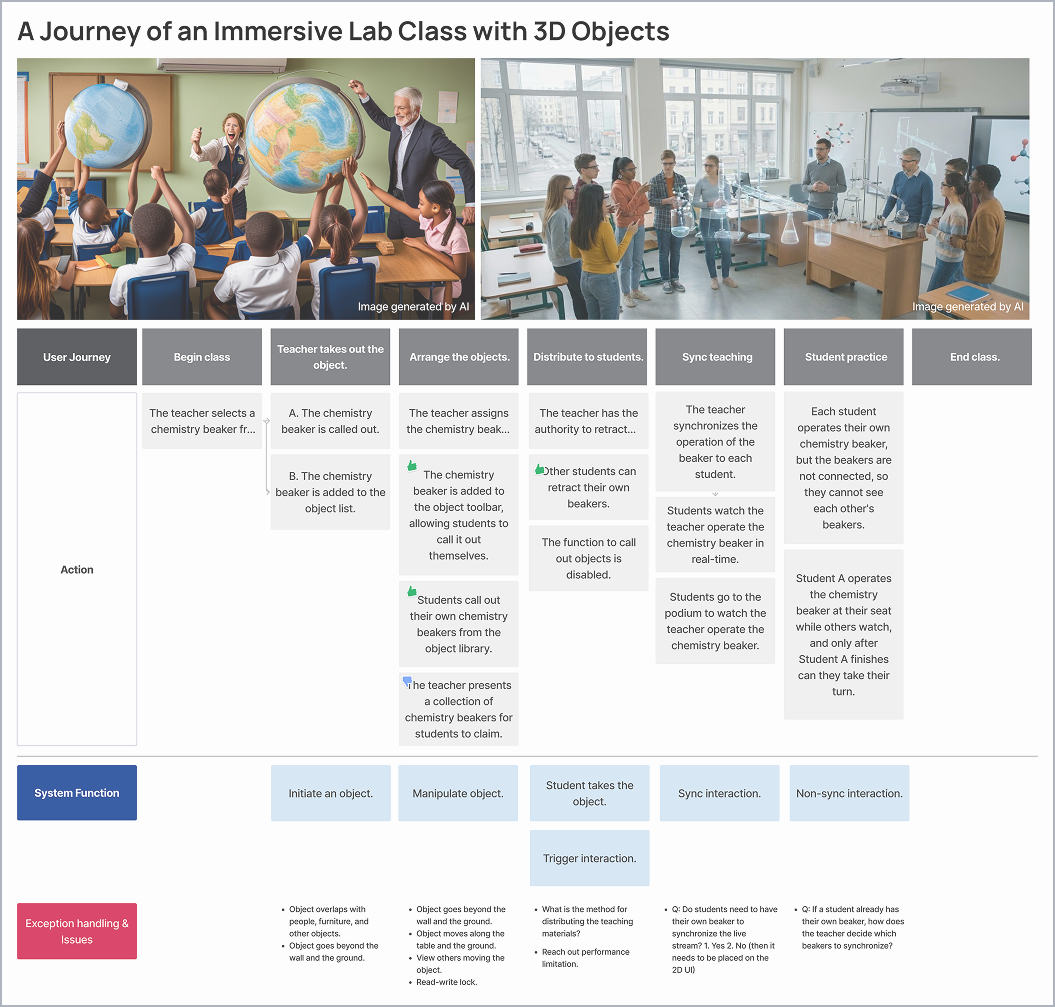
Selected Key Debates: While we resolved dozens of edge cases during the session, four critical design debates stood out. These specific decisions defined the core architecture of our permission system: (1) Asset Provenance (Spawn Logic), (2) Hierarchical Control (Override Power), (3) Concurrency Handling (Conflict Resolution), (4) Contextual Grouping.
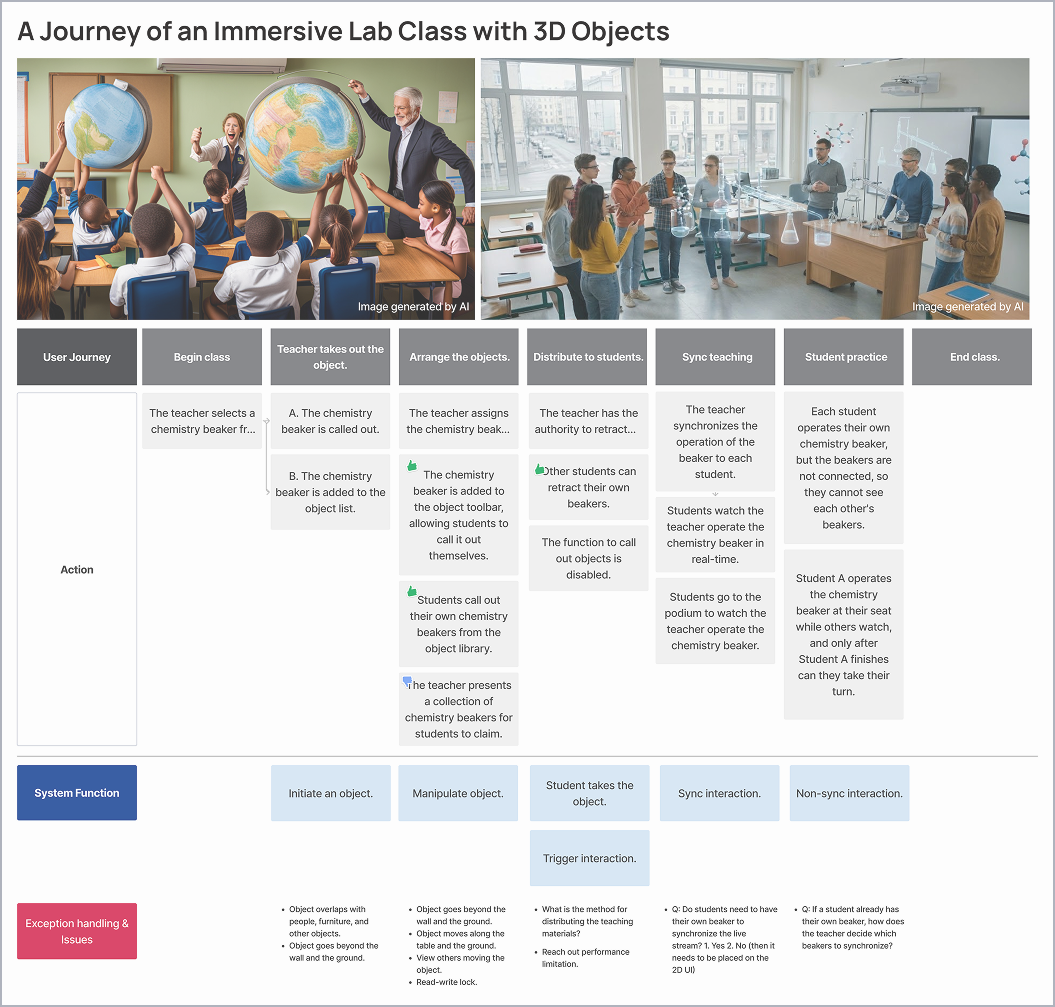
Based on the previous dicussion, define the total design process required and how to manage the permission design during the operation.
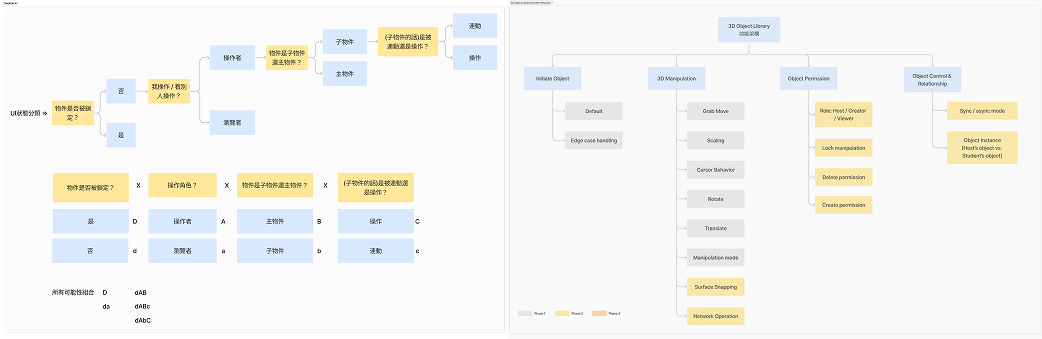
Problem: Teachers are not familiar with 3D spatial interaction
Teacher and student are not familiar with 3D transform. The key reqruirement is to let user access 3d model but yet not lost in interaction.
Comparing Immersive platform, and other platform which have 3D creative technology, we found different manipulation way.
The key differences is “with mode” or “without mode”. In finally, we deicde without mode as default move way. User also can manipulate object when switching to other mode.

Spatial Manipulation Design for Non-Gamers: with mode or without mode
With mode: user can manipulate via 3 or more types of transform, seperate the 3 axis and 3 kinds of transform.
After discuss with sales and teacher profession. We decide the following interaction:
- Grab Move (Primary, withtout mode): when dragging, object will move along the user’s front direction, and rotate toward user.
- Seperate manipulation (with mode): when user wants to adjust slightly and precisely.
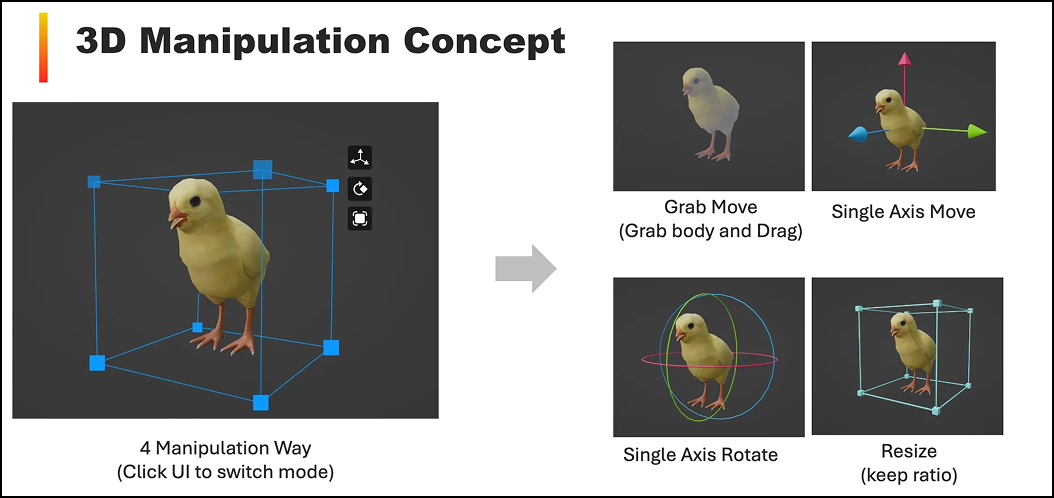
Design Highlights
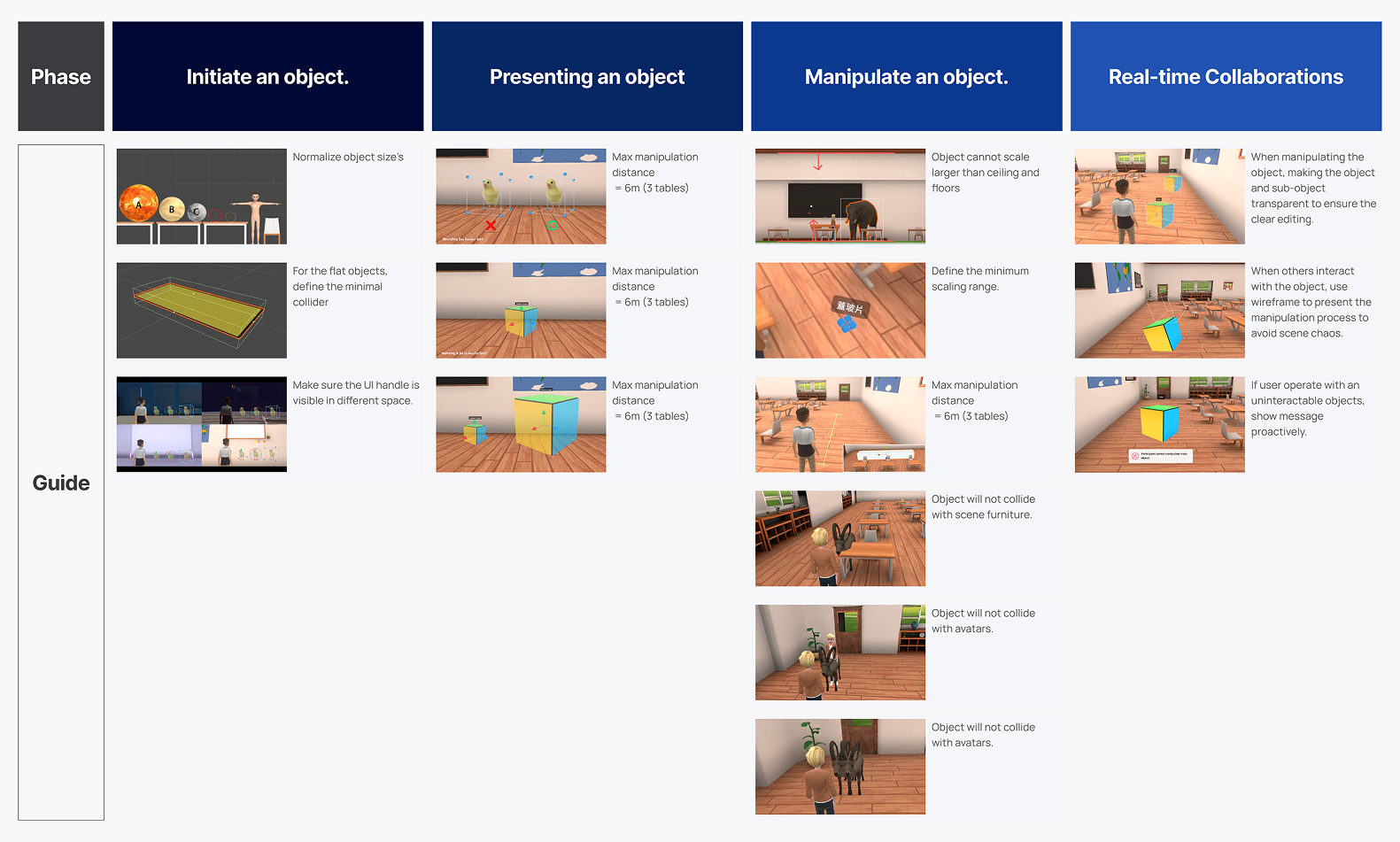
Design Guidelines & Rules to robust experience.
To build a smooth experience, I carefully raise up 15 rules for 3D object library, to ensure the 300+ various objects in over 30 spaces could be interaction well.
Make 2D collaborative board movable, open anywhere.
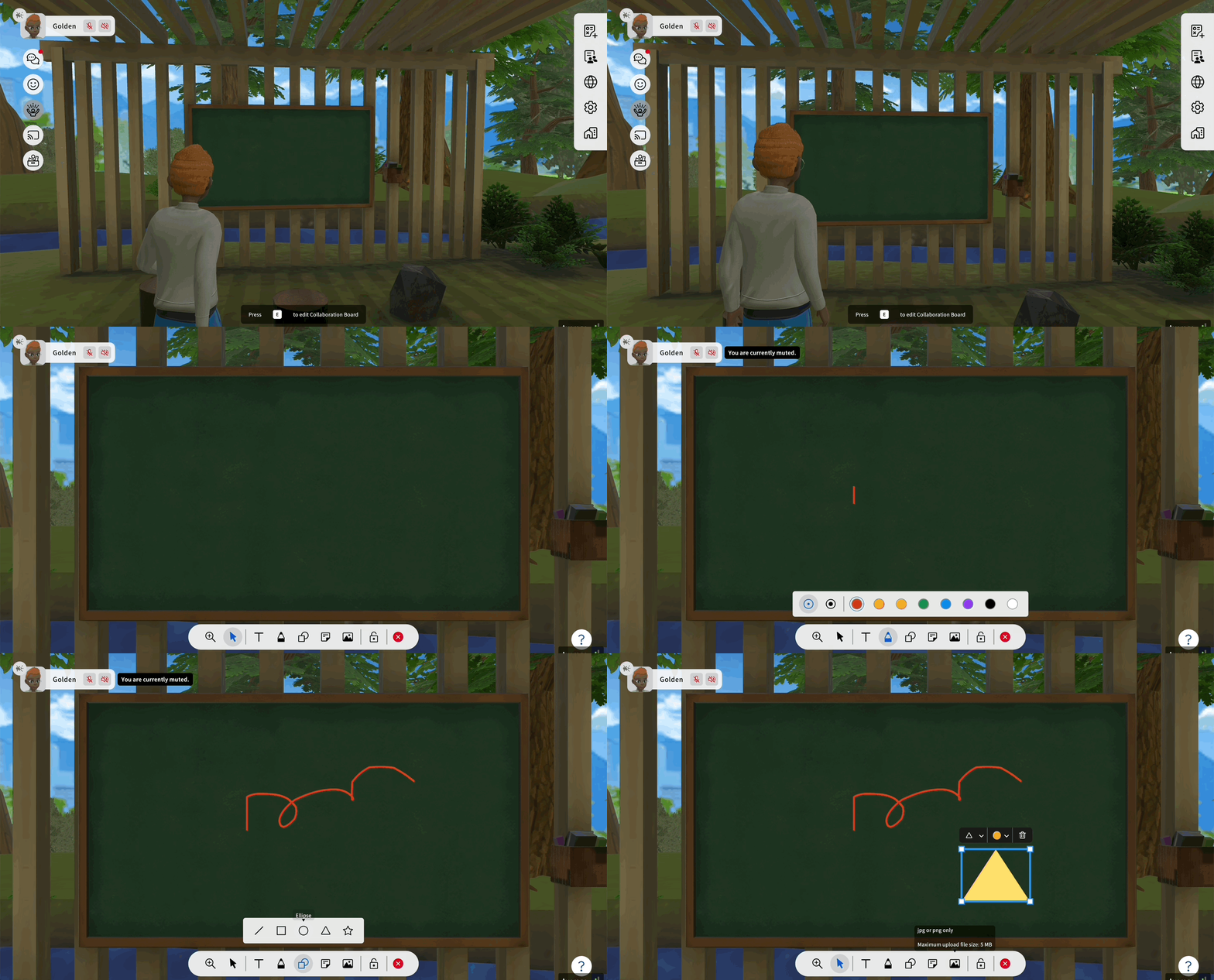
We are transforming static 2D whiteboards into portable, manipulatable 3D objects. No longer fixed to a single spot, these boards can be positioned anywhere to serve various classroom needs—from projection screens to group presentations. However, currently, collaborative boards are merely static props, restricted by fixed sizes and inconsistent styles.
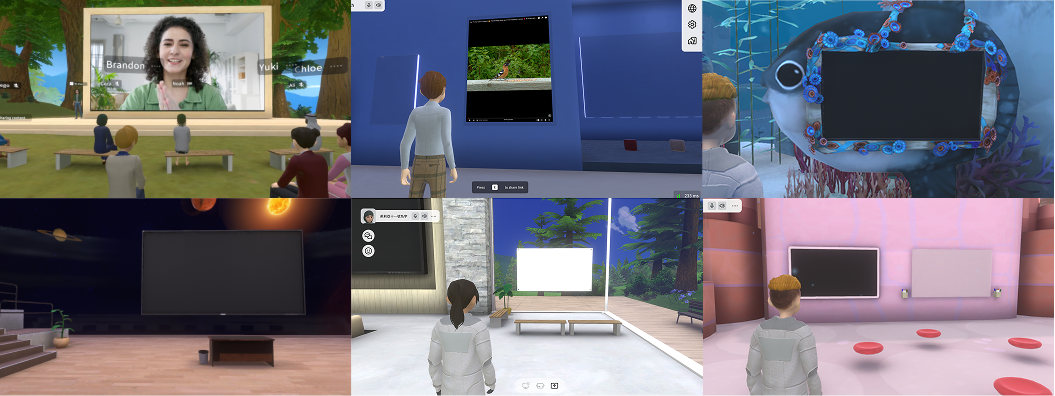
Redefining the “Writable Surface”: Learning from Physical Classrooms
By mobilizing the whiteboard, we transformed it from a static collaboration tool into a dynamic spatial asset. However, this freedom introduced new ambiguities in governance and interaction.
To resolve this, we returned to the essence of a “Writable Surface.” Drawing analogies from K-12 classroom dynamics (across lower to upper grades), we conducted a dialectic on three core dimensions:
- Data Lifecycle: How long should content persist?
- Cross-Room Permissions: How does ownership travel between spaces?
- Collaboration Patterns: How do different age groups interact?
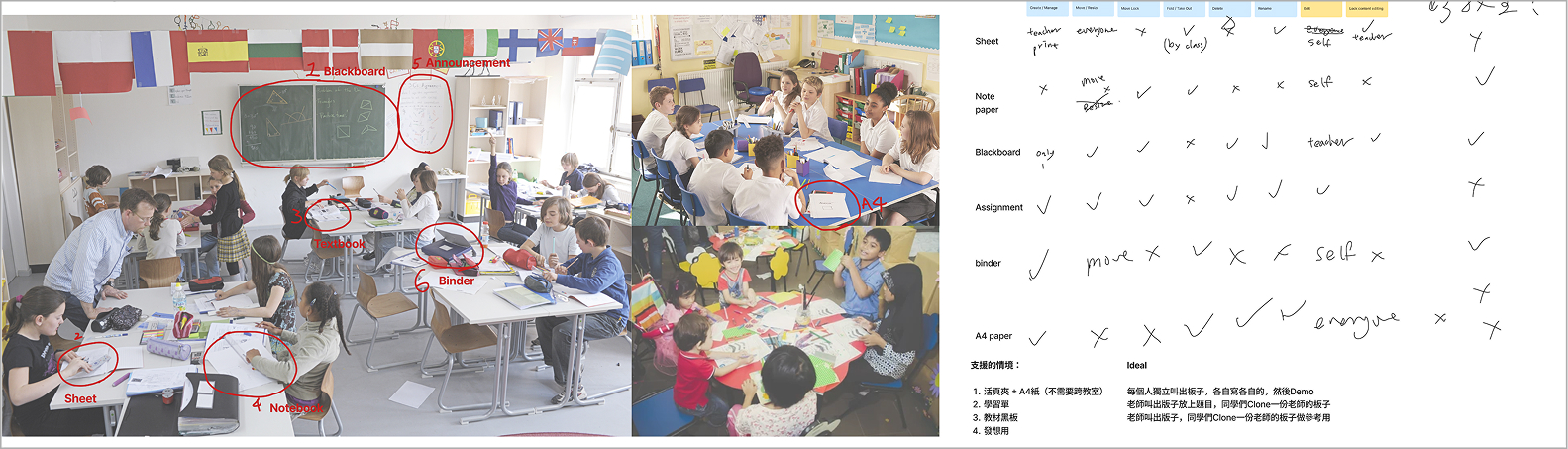
Converged Directions: Two Whiteboard Archetypes
Direction 1: Ephemeral (Analogy: A loose sheet of A4 paper) This direction emphasizes immediacy and lightweight usage, making it ideal for ad-hoc discussions or rough brainstorming. Data Lifecycle: Not saved (disposable/ephemeral). Scope: Confined to the current classroom (localized). Permissions: Open editing access for all (high collaboration).
Direction 2: Persistent (Analogy: A page in a binder) This direction emphasizes archiving and portability, making it ideal for personal notes or preserving key outcomes. Data Lifecycle: Saved and stored (retrievable). Scope: Transferable across classrooms (portable). Permissions: Restricted editing access (private/low collaboration).
After evaluating technical feasibility and complexity with the PM and Engineering team, we decided to proceed with Direction 1. Based on this decision, we finalized the specific permission settings, multiplayer interaction rules, and data lifecycle for a disposable whiteboard experience.
After evaluating technical feasibility and complexity with the PM and Engineering team, we decided to proceed with Direction 1. Based on this decision, we finalized the specific permission settings, multiplayer interaction rules, and data lifecycle for a disposable whiteboard experience.
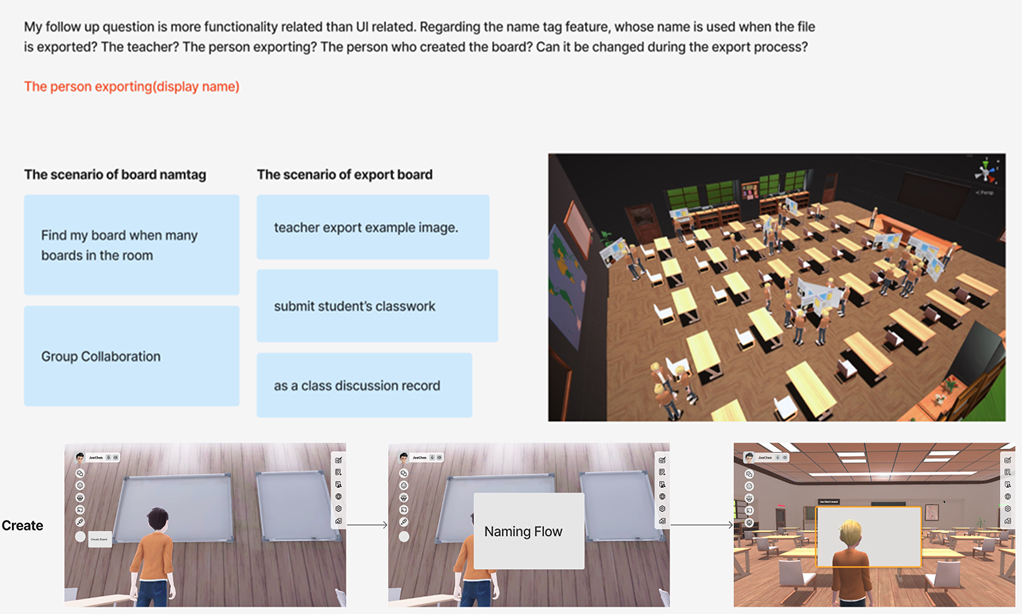
Using board for 30 students’ classroom
To ensure the interaction won’t bother each other.
Thanks for another designer has made a simulate the interaction for 30 students and teacher in a classroom space.
I made a figJam board to interview with US sales and education specialist, to ensure the education scenario understanding. And requirement fit their expectation
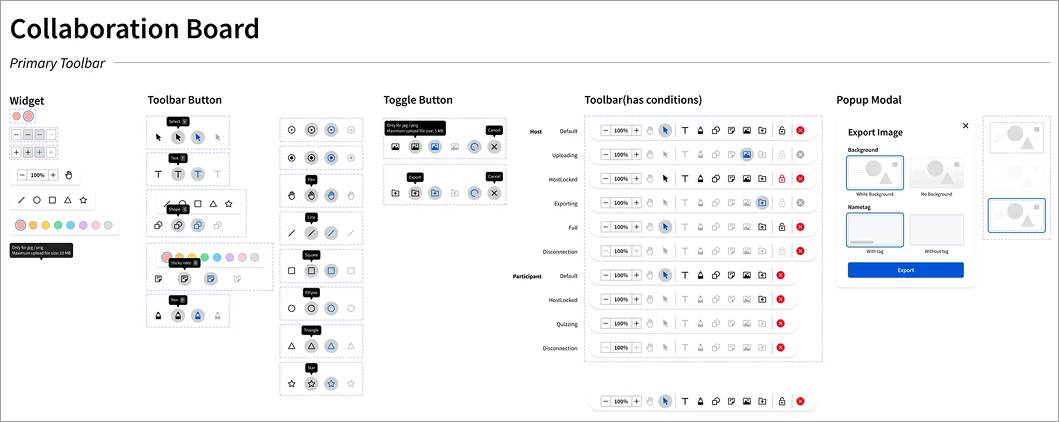
Define the UI structure for board.
I draw each flow about board spatial interaction and permission, discuss with the developer team, to ensure all conditions can be catch up. Finally we found at least 36 cases should be handled.
Design Hightlights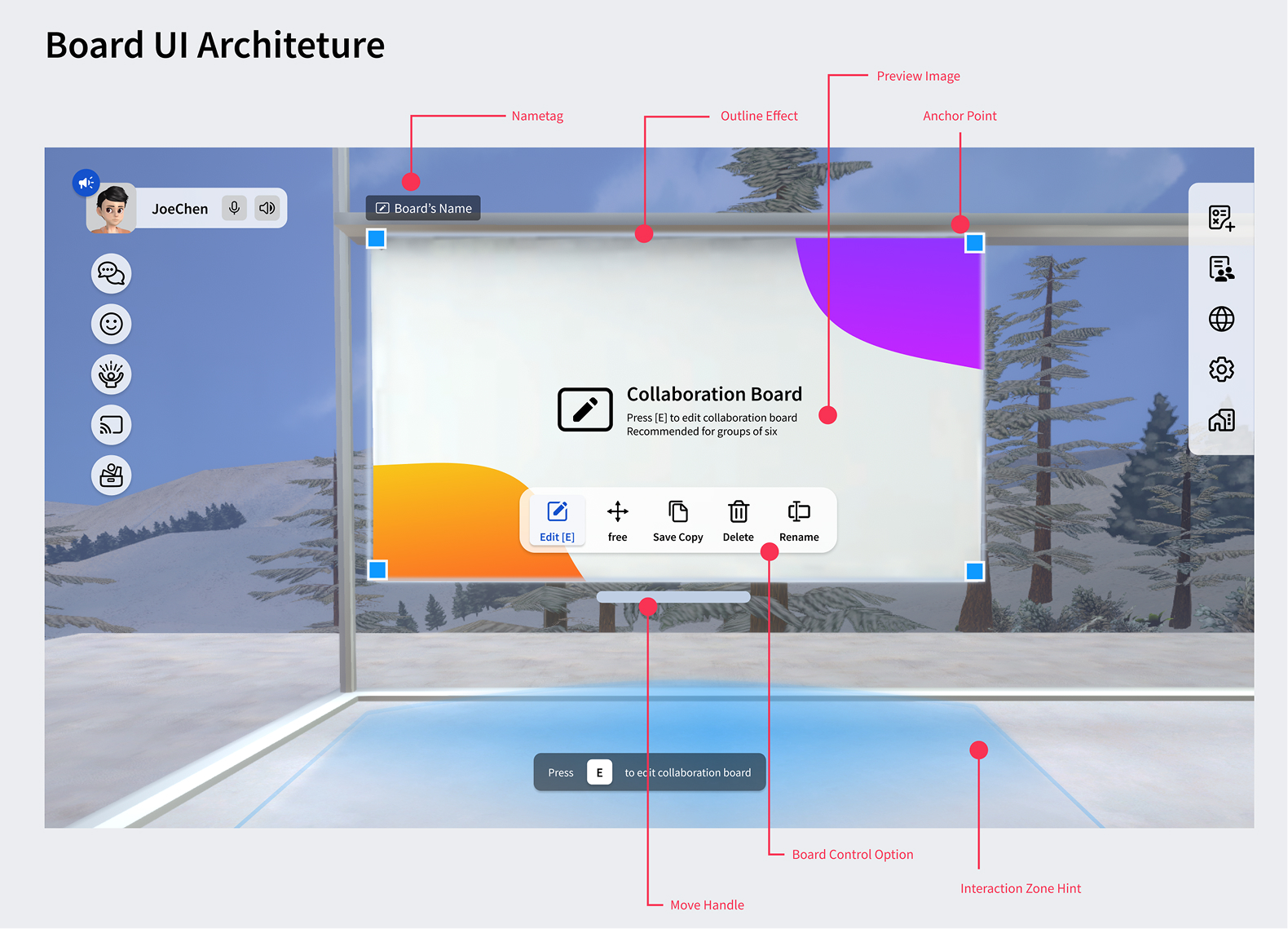

Natural Interaction Intention Transition from 2D to 3D
I draw a state flow from aware a board to interact a board, and design correspond feedback and signifier for each state, to guide user interact with board naturally. 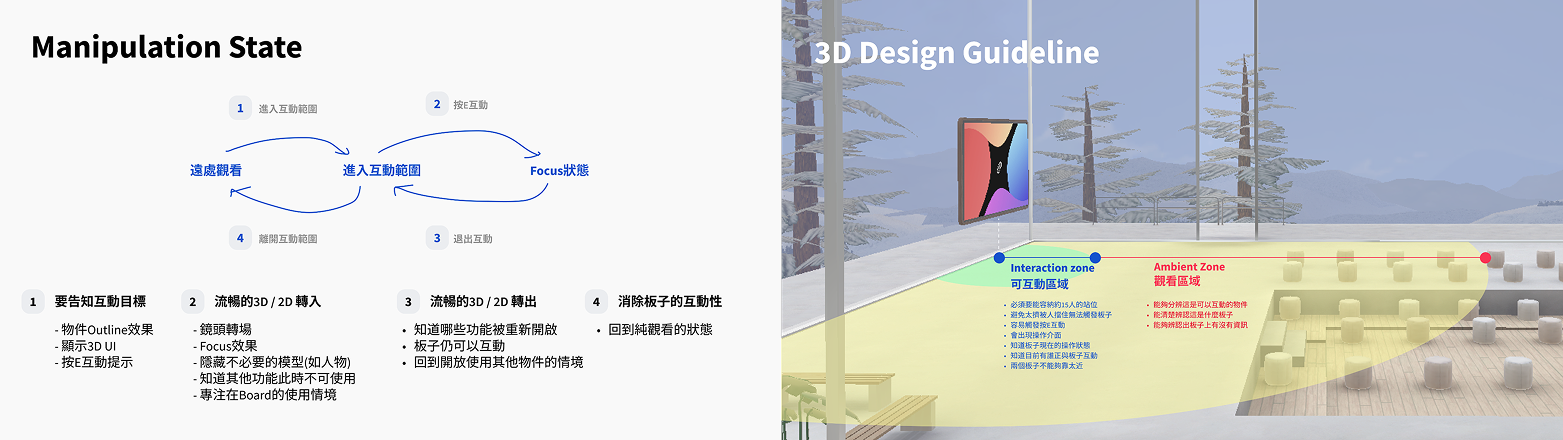
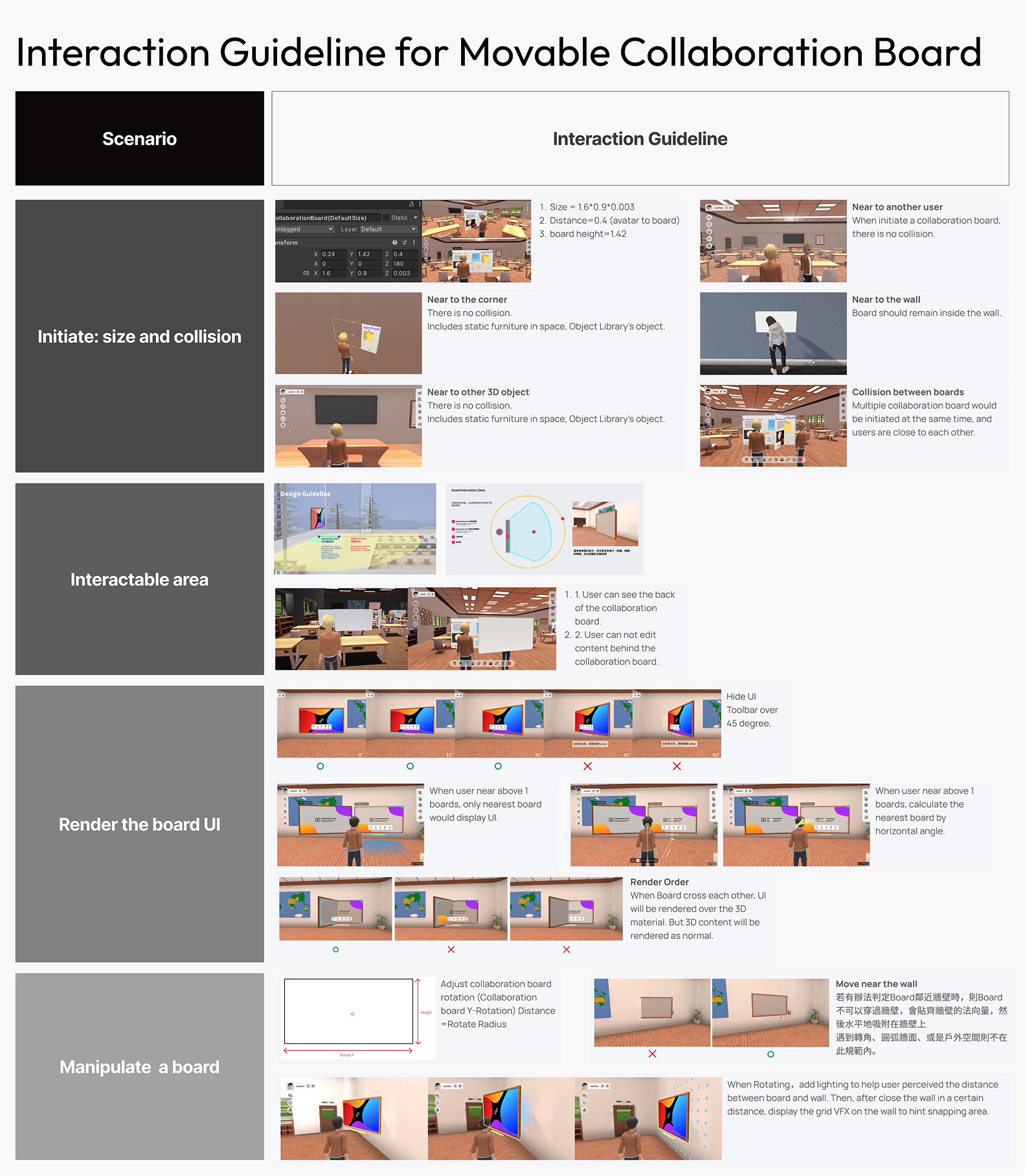
Govern the chaos for 30 students: the behavior rules and guidelines
This table shows the constraint and conditions to implement the collaborative board, to maximize the usage and support teacher manage collaborative board for them.
Additional: Should we integrate the static board and movable board?
Direction 1: No, sepraate keep 2 kinds of board.
Pros: low cost and develop dependency Cons: user may confuse use: which one can be move? why different?
Direction 2: yes, all board’s outlook should unify.
Pros: consistent design and behavior, lower cognitive load. Cons: low viability, extreme workload.
Design a new look for movable perceived affordance
When developing the visual appreance for the new board, I reference some tangible UI and VR interaction. apply the metaphor of handle area of the board. Then propose a design direction from skeumorphism to Virtuality to 3D artist.


To lower the noise about the board backside but cannot interact, I discuss with 3D artist the handle and board appearance, finally use the more C version to reduce the distribution of too many object.

Conslusion
It’s a wonderful journey to have so much resources to build the 2 big features, in 6 months.
- The 3D object library feature help us acquire the first oversea user (Nanyang Technological University, Singapore).
- The movable board eventually halt due to dev team reorganization.
Reflection
It’s a framework to architect the design rationale about how to think Interface and behavior design over 3D and 2D.